

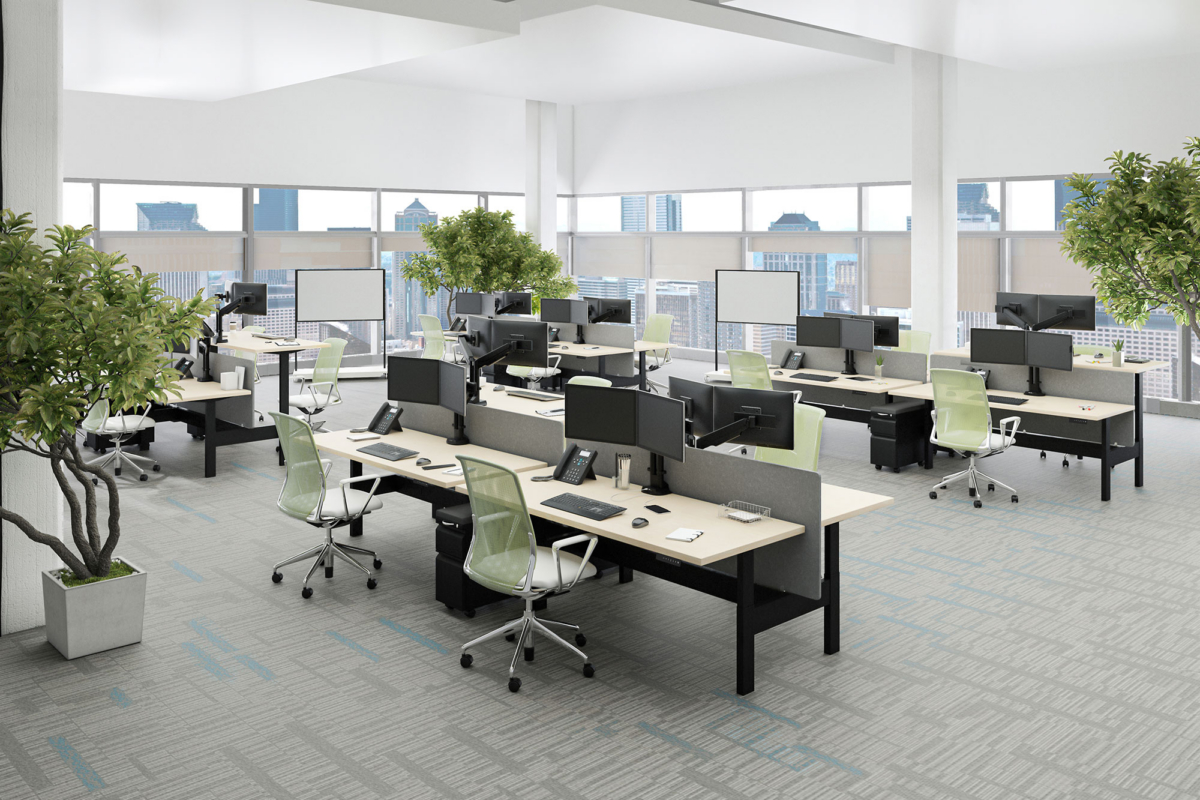
“Hoteling” sounds simple: fewer assigned desks, more flexibility, better use of space.
But anybody who’s lived through a poorly executed hot-desk setup knows the truth—hoteling only works when it’s properly designed. If the office feels like a pop-up shop (wobbly desks, zero privacy, nowhere to plug in, scuffed surfaces), people stop coming in. And then the whole “hybrid workplace” plan quietly falls apart.
Done right, though, hoteling can be a real upgrade. Shared desks can feel:
- Professional
- Clean
- Ergonomic
In other words, like a workplace you’d actually be proud to bring a client into—and comfortable enough to do focused work in for a full day.
At Lyco Workspace Solutions, we design hoteling environments that withstand real office traffic. Not residential-grade furniture. Not online marketplace shortcuts. We specify heavy-duty, commercial-grade systems built for daily use, with integrated power, smart ergonomics, and serviceable components backed by warranty.
Here’s what “hoteling done right” really means—and what to avoid if you don’t want to redo it in a year.
Why Hoteling Has Taken Off (and Why It’s Not Going Away)
Hybrid work didn’t just change schedules—it changed how companies justify office space.
Many organizations now plan for people to be in the office only part of the week. For example, CBRE’s research has reported employers expecting around 3 days in-office per week in its occupier sentiment reporting—essentially confirming hybrid as the ongoing model rather than a temporary phase.[2]
And hybrid isn’t just policy—it’s also preference. Microsoft has reported that a large share of workers want a reason to come in, and that 85% would spend time in the office to rebuild team bonds (one of the strongest arguments for keeping offices engaging and functional).[5]
That’s where hoteling comes in.
If people are in the office for collaboration, connection, and “the moments that matter,” you don’t necessarily need a dedicated desk for every single employee, every single day. But you do need a workplace that makes coming in feel worth it.
Which brings us to the biggest hoteling mistake.
The #1 Mistake: Buying Lightweight, Residential-Grade Furniture
A lot of hoteling projects fail for a predictable reason: companies furnish shared desks like they’re outfitting a spare bedroom.
You’ll see:
- Thin work surfaces that chip, swell, or scratch quickly
- Legs and frames that loosen and wobble over time
- “Power solutions” means one wall outlet across the room
- Furniture that isn’t serviceable (so when it breaks, you replace it)
Hoteling desks get more wear than assigned desks because they’re used by more people. Employees slide chairs in and out constantly, move monitors, wipe down surfaces, plug/unplug devices, and reconfigure their setup multiple times per week.
If your furniture isn’t built for commercial use, it shows fast.
And beyond durability, cheap furniture sends the wrong message: “This space is temporary.” That’s the opposite of what you want from an office you’re trying to make magnetic again.
“Shared” Shouldn’t Mean “Uninviting”
A great hoteling station has a specific feel:
- It’s consistent (so employees aren’t hunting for “the one good desk”)
- It’s cleanable (quick resets between users)
- It’s comfortable (for a wide range of body types and work styles)
- It’s plug-and-play (no crawling around for outlets or adapters)
It should feel like a professional workstation—not a folding table with a task chair.
That’s why we focus on the fundamentals that make shared desks work day after day.
What the Right Hoteling Station Includes
1) Adjustable Desks (Yes—Even for Shared Workstations)
Because hoteling is shared, the workstation must comfortably accommodate multiple people. Fixed-height desks are a gamble. Somebody will be too tall, somebody will be too short, and somebody will end up hunching over a laptop all day.
Height-adjustable desks solve that problem immediately. They allow employees to dial in the right height for seated work and support sit/stand options to help reduce prolonged sitting.
Harvard Health has noted that prolonged sitting is associated with health risks, including cardiovascular disease and metabolic issues, and recommends breaking up sedentary time.[6] A sit/stand-capable hoteling setup supports that goal without forcing people to “make do.”
Bottom line: adjustable desks aren’t a luxury in hoteling—they’re a practical way to support comfort across a rotating group of users.
2) Durable, Commercial-Grade Surfaces
Hoteling surfaces are cleaned more often and used more often. If the worksurface can’t handle daily wipe-downs and constant use, it won’t look good for long.
Commercial-grade laminate and durable edge detailing matter because they resist:
- Scratching and scuffing
- Moisture and cleaning products
- Heavy monitor arms and daily equipment movement
It’s not just aesthetics. A desk that looks beat up makes the whole office feel neglected—even if everything else is well-designed.
3) Integrated Power and Data (Where People Actually Need It)
If you want employees to use hoteling stations without friction, power must be built into the experience.
That usually means:
- Convenient desktop or in-surface power access
- USB-C/USB charging (depending on standard devices)
- Cable management that keeps cords controlled and professional
- Data options where needed (or planning for Wi-Fi performance and device needs)
People shouldn’t have to choose their seat based on proximity to a wall outlet.
4) Ergonomics That Work for Different People
Hoteling fails when the “shared” part creates an ergonomic mismatch.
The workstation should support:
- Proper monitor height and placement
- Comfortable keyboard/mouse positioning
- Seating that adjusts appropriately
- Reasonable privacy and acoustic considerations, depending on the space
OSHA’s workstation guidance emphasizes changing positions and avoiding staying in the same posture for long periods—another reason flexible setups (and varied work areas) matter.[7]
With hoteling, you’re not just designing a desk—you’re designing a repeatable, comfortable experience for whoever uses it that day.
5) Serviceable Components and Real Warranty Coverage
This is a major separator between commercial-grade systems and “cheap-but-fast” furniture:
- Commercial systems are designed to be maintained
- Components can be replaced
- Manufacturers provide warranties and support
When a power module fails or a leg gets damaged, you shouldn’t replace the entire desk. You should be repairing it—and moving on.
That’s how hoteling stays cost-effective long-term.
Hoteling Is a Space-Planning Project (Not Just a Furniture Purchase)
A big misconception is that hoteling is just “buy some desks and add a booking app.”
In reality, hoteling works best when you design the ecosystem around it:
- How many people are typically in the office on peak days?
- Do teams come in together, or is attendance scattered?
- How much heads-down focus work happens in the office vs. at home?
- Where do quick collaboration moments happen?
- Do you need phone booths / focus rooms / quiet zones nearby?
JLL has published workplace guidance emphasizing that office environments and furnishings should support a variety of work modes—focus, collaboration, and wellbeing—rather than forcing a single layout to do it all.[3]
If your office is mostly open-plan, with only rows of shared desks, hoteling can be stressful. If your office has a balanced mix of settings, hoteling becomes natural.
The Hidden Goal: Make Coming In Feel Effortless
Hoteling doesn’t succeed when it’s merely “available.”
It succeeds when employees can walk in and think:
- “I know where I’m going.”
- “I’ll have power.”
- “The desk will be clean.”
- “I won’t be uncomfortable by noon.”
- “I can focus when I need to.”
And culturally, when people feel the office supports them, engagement tends to rise. Steelcase’s global workplace research has shown connections between workplace satisfaction and engagement, and also highlights that only a minority of workers are highly engaged—an important reminder that workplace experience is part of the engagement equation.[4]
That’s why hoteling should never feel like a downgrade. It should feel like a well-designed system that respects people’s time and comfort.
How Lyco Workspace Solutions Approaches Hoteling
At Lyco Workspace Solutions, we treat hoteling as a professional workplace strategy—not a furniture shortcut.
We specify commercial-grade systems designed for daily use, and we plan hoteling stations with the details that make them work in real life:
- Adjustable desks that accommodate different users
- Durable surfaces built for constant use and frequent cleaning
- Integrated power & data designed into the workstation (not added as an afterthought)
- Serviceable components and warranty-backed solutions for long-term reliability
Most importantly, we design hoteling environments that scale with your team—so when attendance patterns shift or departments grow, your workplace can adapt without starting over.
If your hoteling setup has ever felt uninviting, flimsy, or chaotic, it’s not because hoteling “doesn’t work.” It’s because it wasn’t designed to.
Hoteling only works when properly designed. And when it is, shared desks don’t feel shared—they feel ready.
Sources
[1] Gartner press release (Oct 25, 2022) – “Gartner Says 60% of Hybrid Knowledge Workers…”
https://www.gartner.com/en/newsroom/press-releases/2022-10-25-gartner-says-60-percent-of-hybrid-knowledge-workers-report-their-direct-manager-is-one-of-the-top-two-influences-on-their-connection-to-corporate-culture
[2] CBRE report page – “2025 Americas Office Occupier Sentiment Survey”
https://www.cbre.com/insights/reports/2025-americas-office-occupier-sentiment-survey
[3] JLL insights – “Four ways to refresh the office for hybrid working” (Aug 21, 2024)
https://www.jll.com/en-us/insights/four-ways-to-refresh-the-office-for-hybrid-working
[4] Steelcase Global Report PDF (2016) – “Engagement and the Global Workplace”
https://cdn2.hubspot.net/hubfs/1822507/2016-WPR/Americas/Final_Digital_PDF.pdf
[5] Microsoft Inside Track (May 1, 2025) – “Empowering flexibility… Microsoft Places” (includes Work Trend Index data callouts, including 85% rebuilding team bonds)
https://www.microsoft.com/insidetrack/blog/empowering-flexibility-our-guide-for-deploying-and-driving-adoption-of-microsoft-places/
[6] Harvard Health Publishing (Aug 13, 2020) – “The dangers of sitting”
https://www.health.harvard.edu/pain/the-dangers-of-sitting
[7] OSHA eTools – “Computer Workstations: Good Working Positions”
https://www.osha.gov/etools/computer-workstations/positions